
The Amazon Listing Optimization Checklist: Title to A Plus to Backend
A field-by-field pass over every part of a product detail page — including the 75-character title rule and the new item highlights attribute that landed in 2026.


Amazon listing optimization is a field-by-field pass over every input Amazon can read and every element a shopper can see: title, item highlights, bullets, description, backend search terms, structured attributes, images, video, A+ Content and Brand Story, variations, category and browse nodes. Each field has a job, a constraint that actually applies, and a failure mode we see over and over. This checklist walks all of them in the order we work a listing, with the 2026 rules that changed underneath most existing catalogs.
Amazon listing optimization is two jobs, not one
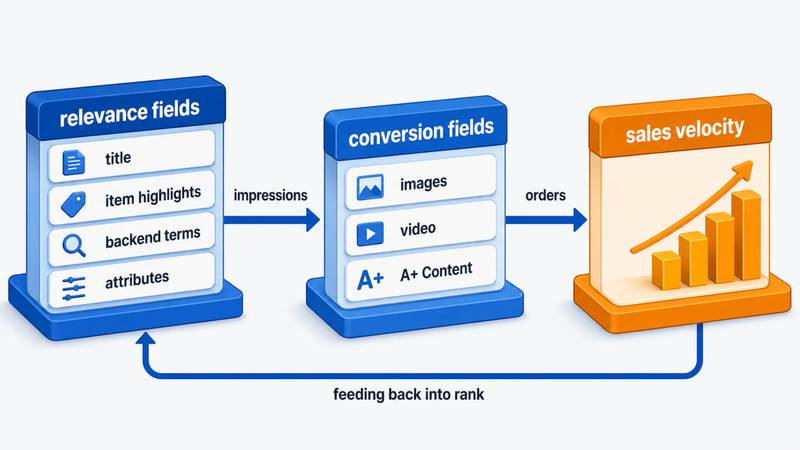
Every field on a product detail page does one of two things, and a few do both. Some feed relevance — they decide which queries you can appear for at all. Others feed conversion — they decide whether the click turns into an order. Confusing the two is the most common reason a rewrite goes nowhere.
Because sales velocity feeds back into ranking, the two compound: a listing that converts better on the same traffic climbs, which is the mechanism behind how Amazon ranking actually works. So the working order is fix indexing, then fix the page, then test — not the other way round.
The field map
| Field | Primary job | Constraint that applies |
|---|---|---|
| Title | Relevance + conversion | 75 characters incl. spaces in all non-media categories since 27 July 2026 |
| Item highlights | Relevance | New attribute, up to 125 characters, indexed for search |
| Bullet points | Conversion, some relevance | 5 bullets in most categories; per-bullet limits vary by category and account type |
| Product description | Conversion, weak relevance | 2,000 characters in the standard field |
| Backend search terms | Relevance only | 250 bytes — not characters |
| Structured attributes | Relevance + filters | Category-specific; drives left-rail refinements |
| Category / browse node | Relevance + eligibility | One primary node; wrong node kills discoverability |
| Images | Conversion | Main image: pure white, product ≥85% of frame, ≥1,600px long side for zoom |
| Video | Conversion | Brand Registry required for most placements |
| A+ Content / Brand Story | Conversion | Brand Registry; Brand Story is a gate to Premium A+ |
| Variations | Both | Legitimate variants only; consolidates reviews and traffic |
One warning before we go field by field: character limits and style rules on Amazon are category-specific and change without much notice. Treat every number here as a starting point and confirm it against your own category's Style Guide in Seller Central before a bulk rewrite.
The relevance fields
Title
The rule changed in mid-2026 and most catalogs still haven't caught up. Amazon announced on 10 June 2026 that from 27 July 2026, product titles in every category except media must be 75 characters or fewer including spaces — down from the 200 characters most categories allowed. Brand name counts toward the 75. Amazon's stated reasons, reported consistently across trade coverage of the announcement, are mobile truncation and consistency with other retailers.
Listings still over the cap get rewritten by Amazon's systems, gradually, without seller action. Brand-registered sellers get a review window through Review Listings Changes in Seller Central; unregistered sellers do not. That is the argument for rewriting your own titles rather than waiting: an AI-generated title assembled from your bullets and backend terms will not preserve compliance language, sizing conventions or your category's phrasing.
The older style rules still stand: no promotional or subjective language ("Best", "Top Rated"), no special characters unless part of the brand name, no word repeated more than twice apart from prepositions and articles.
How to spend 75 characters. Brand, then the head term a real shopper types, then the one or two attributes that qualify the purchase (count, size, form, flavor, compatibility). Nothing else fits, and that is the point.
The mistake we see most: treating the title as a keyword container. A title stuffed with near-duplicate phrases now breaks the repetition rule, truncates on mobile and reads like spam — while contributing nothing that item highlights and backend terms can't carry.
Item highlights
Alongside the title cut, Amazon introduced item highlights: an additional attribute of up to 125 characters for details like materials, use cases, age range and compatibility, confirmed as indexed for search and displayed alongside the title. Title plus item highlights keeps the total indexable budget near 200 characters — the space didn't disappear, it moved. This is the field to fill first if you do nothing else this quarter: it is new, most competitors have left it empty, and it is where the qualifiers that no longer fit a 75-character title belong.
The mistake we see most: leaving it blank because the flat file or category spec sheet doesn't show the attribute yet. Check the single-ASIN editor in Seller Central as well as the bulk template — as of Q3 2026, availability is rolling out unevenly.
Bullet points
Five bullets in most categories (some vendor accounts get more). Per-bullet character limits are genuinely inconsistent across categories and account types — reported caps range from 255 to 500 characters, and the field often accepts more than policy allows. What is stable is the behavior: everything you write is shown to the shopper, but only the earlier portion carries indexing weight, and long bullets collapse on mobile.
Practical target: around 200 characters per bullet, front-loaded. The first few words carry the benefit in plain language; the rest supplies the proof. If a shopper reads only the opener of each bullet, they should know what the product is, who it's for, and why this one.
Bullets also do double duty as source material for Amazon's shopping assistant — renamed from Rufus to Alexa for Shopping on 13 May 2026 and now embedded in the search bar and results page rather than a separate chat window. Assistant answers are assembled from listing copy, attributes, Q&A and reviews, so bullets phrased as answers to real buying questions get surfaced. That mechanic is worked through in our listing checklist for the shopping assistant.
The mistake we see most: five bullets of features with no objection handling. The bullets that move conversion answer "will this fit / will this last / what if it doesn't work".
Product description
2,000 characters in the standard field, and HTML formatting advice from older articles is outdated. When A+ Content is published the description is replaced for most shoppers, so its role is narrow: a fallback for accounts without Brand Registry, and a text block Amazon still reads. Write it, keep it accurate, don't spend a week on it.
Backend search terms
The generic keywords field is limited to 250 bytes, not 250 characters, per Amazon's own seller help and forum guidance. Accented and non-Latin characters consume more than one byte each. Exceeding the limit does not truncate — Amazon can disregard the whole field, so you lose all of it rather than the overflow.
Rules that actually matter here:
- Don't repeat words already in the title, item highlights or bullets — Amazon indexes those, so repeating wastes bytes.
- Separate with spaces, not commas. Commas consume bytes for nothing.
- No competitor brand names, no ASINs, no subjective claims — policy violations, not clever tactics.
- One form of singular or plural; Amazon handles the other.
- Expect roughly 24–48 hours before new terms are reflected in indexing.
Use the space for spelling variants, regional synonyms and intent phrases that don't fit anywhere customer-facing. Which phrases those are is an output of research, not intuition — the method is in our keyword research workflow.
The mistake we see most: the field pasted full of the title's own words, then padded to the byte limit. Fewer, more relevant terms outperform a full field every time.
Structured attributes, category and browse nodes
The least glamorous section and often the highest-yield. Structured attributes — material, scent, form, count, dietary flags, wattage, breed size, whatever your category defines — populate the left-rail filters, match refinement-based queries, and feed the shopping assistant when a shopper asks for a specific property. An empty attribute is an entire filtered segment you don't appear in.
Category and browse node placement sits underneath all of it. The wrong primary node means the wrong Best Sellers rank, the wrong filters, sometimes the wrong badge eligibility. Check the node your top three competitors sit in; if you're somewhere else, that's usually a finding, not a preference.
The conversion fields
Images
The main image is the highest-leverage asset on the page — it wins the click from search results before a word of copy is read. Requirements are strict and automatically enforced: pure white background at RGB 255,255,255, the product filling at least 85% of the frame, no text, logos, watermarks or borders, and the actual product rather than a render. Minimum 1,000 pixels on the longest side, but 1,600 pixels or more is the practical floor — below that Amazon disables zoom, and zoom affects conversion.
Slots two through nine are where the selling happens: scale reference, in-use context, a comparison or size chart, the closeup that answers the material question, the "what's in the box" shot. Sequence them against the objections your reviews and returns keep raising.
The mistake we see most: seven beautiful lifestyle images and no frame that explains size. Dimension confusion is the quietest return driver in home, pet and kitchen.
Video
Video sits in the image carousel and, for brand-registered sellers, in other placements around the detail page. It doesn't need production value; it needs to show the thing working. Thirty seconds of the product in use, with the point made in the first three, outperforms a ninety-second brand film in nearly every category we work in.
A+ Content and Brand Story
A+ Content requires Brand Registry and replaces the plain description for most shoppers. Standard A+ allows five modules at up to 970px wide; Premium A+ raises that to seven at 1,464px and unlocks video modules, hotspots, carousels and richer comparison tables.
On eligibility: Premium A+ has been available at no additional cost during an extended promotional period, and the published criteria are a Brand Story module live on your brand-owned listings plus five approved A+ projects in the last 12 months — down from the fifteen originally required. Amazon has said it may charge for the feature in future. If Premium isn't showing in A+ Content Manager, a missing Brand Story is the usual reason.
Brand Story is not just a gate. It renders above A+, carries cross-sell tiles to your other ASINs, and is one of the few places a shopper who has never heard of you decides you're a real brand. Module choice, copy length and the comparison-table pattern are covered in our guide to A+ content best practices.
The mistake we see most: A+ built as a brand deck. Modules full of mission statements and lifestyle photography, no comparison table, no dimensions, no answer to the question the shopper scrolled down to resolve.
Variations: one listing or five
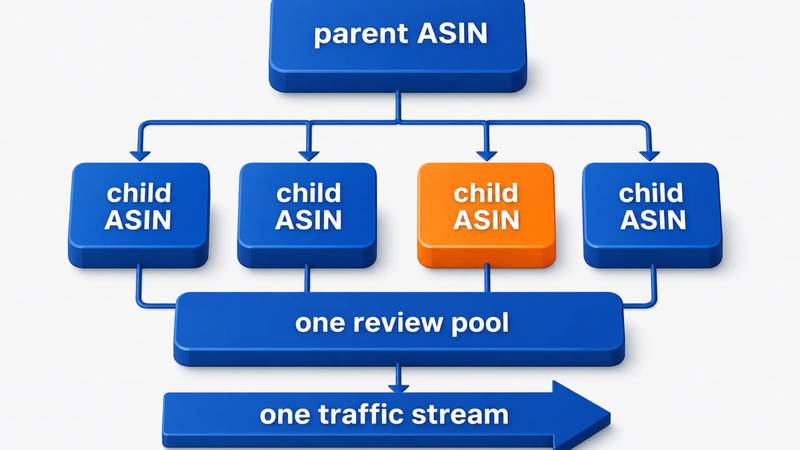
A variation family consolidates reviews, sales history and traffic across sizes, colors, counts and flavors, and gives the shopper one page with the choice on it. Done right it is among the cheapest ranking gains available: a new variant inherits the family's authority instead of starting from zero.
Done wrong it is a suppression risk. Variations are for genuine variants of the same product, not unrelated ASINs bundled to borrow reviews. Watch that every child really is the same product in a different attribute, that the parent's images and copy describe the family rather than one child, and that discontinued children are removed rather than left to drag conversion down.
Prove it with a test, not an opinion
Once the fields are compliant and complete, further optimization is guesswork unless you measure it. Manage Your Experiments (Seller Central → Brands → Manage Experiments, as of Q3 2026) runs A/B tests on titles, images, bullets, description and A+ Content including Brand Story, splitting detail page traffic and reporting units, sales and conversion rate per version. It requires a Professional account, Brand Registry, and an ASIN with enough traffic to reach significance — low-traffic ASINs won't appear as eligible.
Two rules keep tests useful: make the versions genuinely different (Amazon warns you when they're too similar), and don't run them across Prime Day or BFCM. Sequence matters too — test the main image before the title, and the title before the bullets, roughly the descending order of impact on the same traffic.
For one pet supplements brand, that sequence — attributes and backend terms first, then copy rebuilt around real buying questions, then A+ — was the core of a project where organic sales grew 187%, all of it before any change to the ad account.
FAQ
How long is an Amazon product title allowed to be in 2026?
75 characters including spaces, in every category except media, effective 27 July 2026. Amazon announced the change on 10 June 2026 and is auto-rewriting non-compliant titles gradually. A separate item highlights attribute carries up to 125 additional indexed characters, keeping the total indexable budget near 200.
Do backend search terms still work on Amazon?
Yes, but the field is small and strict: 250 bytes, not 250 characters, and exceeding it can void the whole field rather than truncating it. Use it only for terms not already in your title, item highlights or bullets — spelling variants, synonyms, intent phrases — separated by spaces, never commas.
How often should I update my Amazon listings?
Review quarterly, and immediately when Amazon changes a field rule, a competitor overtakes you on a head term, or your conversion rate drops without a traffic-mix explanation. Constant rewriting is counterproductive: each change resets the read on what actually caused a performance shift.
Does A+ Content improve Amazon search ranking?
Not directly — A+ modules are largely images and are not indexed the way title, item highlights, bullets and attributes are. A+ improves ranking indirectly by lifting conversion rate on the traffic you already have, and sales velocity on a query is a ranking input.
Should I optimize my listing before or after starting ads?
Before. Ads amplify whatever conversion rate the page already has, so paid traffic sent to an unoptimized listing buys expensive data and little else. Get indexing, images and A+ in place first, then let advertising accelerate a page that already converts.
What is the most common Amazon listing optimization mistake?
Optimizing only the visible copy. Structured attributes, category and browse node placement, and item highlights determine which filtered and refined searches you can appear in at all — and they are empty or wrong on a large share of catalogs, including well-run ones with beautifully written bullets.
Where to start this week
Work the list top-down and don't skip to the fun parts.
- Compliance and completeness. Every title under 75 characters, item highlights filled on your top ASINs, every structured attribute your category offers completed. A day of work with no creative debate in it.
- Then the page. Main image at 1,600px or larger, secondary images sequenced against your top objections, A+ with a comparison table, Brand Story live across the catalog.
- Then test one thing. Main image on your highest-traffic ASIN, run to significance, keep the winner.
To see the gaps listed for you first, run the catalog through our Amazon growth plan or work the fifteen checks in our listing audit checklist. Ongoing execution across a full catalog is what our Amazon listing SEO work covers.